GCP ACE: Every Google Cloud Load Balancer, Explained
Google Cloud has one load balancing service with a lot of variants. The names are what trips people up: “Network Load Balancer” can mean a proxy or a passthrough, “HTTP(S) Load Balancer” is now called Application Load Balancer, and “classic” is a mode, not a product. This post lays out the full lineup, what separates each variant, and how to choose. It maps to the load balancing options in the planning section of the ACE exam guide.
The two questions that explain everything
Before looking at any product name, there is one distinction that explains most of the differences: does the load balancer terminate the client connection or not?
Passthrough load balancers do not terminate anything. Packets reach the backend VM with the original source and destination IP, protocol and ports unchanged. The TCP connection is terminated on the backend VM itself, and responses go straight back to the client without passing through the load balancer (direct server return, DSR). The client’s real IP is visible to the VM natively.
Proxy load balancers terminate the client connection and open a new one to the backend. Google runs the proxy for you, on Google Front Ends (GFEs) or on Envoy. The backend sees the proxy’s address, not the client’s. To recover the client IP you rely on the X-Forwarded-For header (Application Load Balancers) or the PROXY protocol (proxy Network Load Balancers).
Everything else follows from this:
- Need the app to see who is connecting (IP-based rate limiting, auditing, geo logic in the VM), need UDP/ESP/GRE/ICMP, or want TLS terminated on your own VM: passthrough.
- Need centralized TLS termination, a single anycast IP across regions, or Layer 7 decisions (path routing, header rules, Cloud Armor, CDN): proxy.
One more practical note from Google’s docs: if your authentication logic assumes that the same source IP opens successive connections, a proxy load balancer can break it, because backend connections come from different proxy IPs. For Application Load Balancers, Google recommends Identity-Aware Proxy (IAP) instead of IP-based auth.
The families
Google splits the portfolio into two types, and the second one splits again:
- Application Load Balancers: Layer 7, HTTP and HTTPS only. Always proxy.
- Network Load Balancers: Layer 4. Either:
- Proxy Network Load Balancers: TCP, with optional SSL offload on the global and classic modes.
- Passthrough Network Load Balancers: TCP, UDP, ESP, GRE, ICMP and more.
Two older names you will still see in the console and in exam questions: the HTTP(S) load balancer is now the Application Load Balancer, and the TCP Proxy and SSL Proxy load balancers are now grouped under proxy Network Load Balancers.
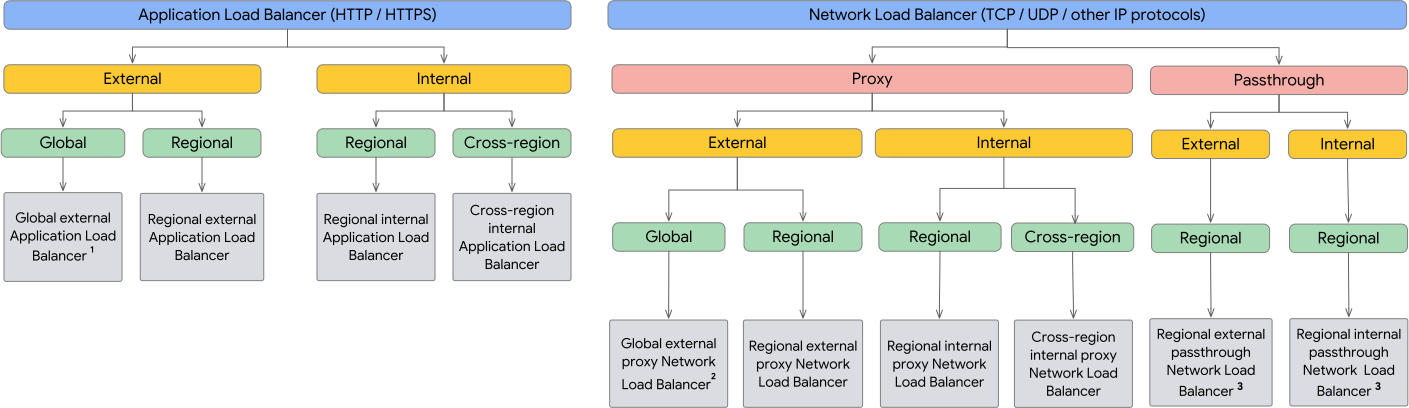
Choose a load balancer. Source: Google Cloud documentation, licensed under CC BY 4.0.
All 13 deployment modes
Each family comes in several modes, defined by external vs internal and global vs regional. The load-balancing scheme is the attribute you set on the forwarding rule and backend service in gcloud.
| Family | Mode | Traffic | Network tier | Scheme |
|---|---|---|---|---|
| Application | Global external | HTTP/HTTPS | Premium | EXTERNAL_MANAGED |
| Application | Regional external | HTTP/HTTPS | Premium or Standard | EXTERNAL_MANAGED |
| Application | Classic | HTTP/HTTPS | Global in Premium, regional in Standard | EXTERNAL |
| Application | Regional internal | HTTP/HTTPS | Premium | INTERNAL_MANAGED |
| Application | Cross-region internal | HTTP/HTTPS | Premium | INTERNAL_MANAGED |
| Proxy Network | Global external | TCP, optional SSL offload | Premium | EXTERNAL_MANAGED |
| Proxy Network | Regional external | TCP | Premium or Standard | EXTERNAL_MANAGED |
| Proxy Network | Classic | TCP, optional SSL offload | Global in Premium, regional in Standard | EXTERNAL |
| Proxy Network | Regional internal | TCP, no SSL offload | Premium | INTERNAL_MANAGED |
| Proxy Network | Cross-region internal | TCP, no SSL offload | Premium | INTERNAL_MANAGED |
| Passthrough Network | Global external (Preview) | TCP, UDP, ESP, GRE, ICMP, ICMPv6 | Premium | EXTERNAL_PASSTHROUGH |
| Passthrough Network | Regional external | TCP, UDP, ESP, GRE, ICMP, ICMPv6 | Premium or Standard | EXTERNAL |
| Passthrough Network | Internal (always regional) | TCP, UDP, ICMP, ICMPv6, SCTP, ESP, AH, GRE | Premium | INTERNAL |
Notes that matter:
- The global external passthrough Network Load Balancer is in Preview as of the docs updated on October 13, 2026. Everything else in the table is generally available.
_MANAGEDin the scheme means the load balancer runs as a managed service on a GFE or Envoy proxy.- You can attach an
EXTERNAL_MANAGEDbackend service to anEXTERNALforwarding rule, but not the other way around. Google recommends migrating classic resources toEXTERNAL_MANAGEDto get the features of the global external Application Load Balancer. - Regional internal load balancers accept traffic only from clients in the same region by default. Enable global access on the forwarding rule to allow other regions.
What each one runs on
| Load balancer | Technology |
|---|---|
| Global external Application, global external proxy Network | Envoy-based GFE |
| Classic Application, classic proxy Network | GFE |
| Regional external and internal Application, cross-region internal Application | Envoy |
| Regional external, regional internal and cross-region internal proxy Network | Envoy |
| Global and regional external passthrough Network | Maglev |
| Internal passthrough Network | Andromeda |
Application Load Balancers
Layer 7, proxy-based, HTTP and HTTPS. This is the one to pick when you want to run and scale a web service behind a single address and route on URL, host or headers.
What you get:
- Backends: managed and unmanaged instance groups, zonal NEGs, serverless NEGs (Cloud Run, App Engine, Cloud Run functions), internet NEGs (endpoints outside Google Cloud), hybrid NEGs (on-premises or other clouds), and Cloud Storage backend buckets.
- Routing through a URL map: host and path rules, redirects, rewrites, header-based routing.
- Protocols from clients: HTTP/1.1, HTTP/2, gRPC (over HTTP/2), WebSockets. HTTP/3 (QUIC) is supported on global and classic modes only, not regional or internal.
- Cloud CDN works with the global external and classic Application Load Balancers.
- Cloud Armor integrates for DDoS and application attack protection.
- Client IP reaches the backend in the
X-Forwarded-Forheader.
The modes:
- Global external: backends in multiple regions behind one anycast IP, with automatic multi-region failover. Premium Tier only.
- Regional external: backends in a single region, traffic terminated in that region. Choose this when compliance requires TLS termination in a specific region, or when you want Standard Tier. IPv4 termination only in the standard case.
- Classic: the legacy mode. Global in Premium, but in Standard Tier it can only send traffic to backends in a single region. New deployments should use the global external mode.
- Regional internal: internal IP, reachable from the VPC and from connected networks (peering, Cloud VPN, Interconnect). Backends in one region.
- Cross-region internal: internal IP from a regional subnet, backends in multiple regions, globally accessible by default.
Proxy Network Load Balancers
Layer 4 reverse proxies for TCP traffic. They terminate the connection at the load balancer and forward it over a new TCP connection to the closest available backend.
- Global and classic modes accept TCP or SSL on the frontend. If you pick SSL, the load balancer offloads TLS and you manage certificates in one place.
- Regional external and both internal modes are TCP only, with no SSL offload.
- Backends can be instance groups, zonal NEGs, hybrid NEGs, and (in regional modes) internet NEGs, so they work for on-premises and multicloud backends.
- Client IP is not preserved by default. Enable the PROXY protocol on the backend service if the backend needs it, and make the backend parse it.
Use it for non-HTTP TCP services that need global distribution or TLS offload at scale, for example a database proxy, a custom TCP protocol, or an SMTP service.
Passthrough Network Load Balancers
Layer 4 and not proxies. Built on Maglev (external) and Andromeda (internal).
- Regional external: internet-facing, backends in one region. Can use a backend service (recommended) or a target pool (legacy, covered below). Also receives traffic from Google Cloud VMs with external IPs or that reach the internet through Cloud NAT.
- Global external (Preview): backends in multiple regions, backend service only. Provides two anycast IP addresses, each served by a disjoint, isolated infrastructure (an availability group), for high availability.
- Internal: internal IP, always regional, reachable from the VPC and connected networks. It can also be used as a next hop in a route, which is how you place third-party firewalls and virtual appliances in the traffic path.
Behavior to remember:
- Source and destination IP, protocol and ports arrive unchanged on the VM.
- Responses go straight from the VM to the client (DSR). The VM must be configured to answer on the load balancer’s IP.
- Session affinity here is hash-based on the packet tuple (
CLIENT_IP_NO_DESTINATION,CLIENT_IP,CLIENT_IP_PROTO,CLIENT_IP_PORT_PROTO, orNONE), not on cookies. Cookie and header affinity belong to the Application Load Balancers. - Failover to backup backends is configurable on the backend-service-based regional external and internal modes.
Target pools
A target pool is the original way of telling the regional external passthrough Network Load Balancer where to send traffic: a list of VM instances plus a legacy HTTP health check. Google keeps it for existing setups, and Quick Lab exercises still use it, but the docs recommend backend services for new deployments.
Limitations of target pool-based load balancers, from Google’s feature comparison:
- Only the regional external passthrough Network Load Balancer supports them.
- Health checks: only the legacy HTTP health check.
- No IPv6 traffic.
- Failover uses backup pools instead of the configurable failover policy, and connection draining on failover cannot be configured.
- When every backend in a target pool is unhealthy, traffic is distributed across all of them rather than dropped.
Google provides a migration path from target pools to backend services. The backend service model is shared by almost every other load balancer type, which is why it is the one to learn.
# Legacy: target pool-based external passthrough load balancer
gcloud compute http-health-checks create basic-check

gcloud compute target-pools create www-pool \
  --region=europe-west1 \
  --http-health-check=basic-check

gcloud compute target-pools add-instances www-pool \
  --instances=www1,www2 \
  --instances-zone=europe-west1-b

gcloud compute forwarding-rules create www-rule \
  --region=europe-west1 \
  --ports=80 \
  --target-pool=www-pool
What a load balancer is made of
The load balancer is not a single resource. It is a chain, and the exam likes asking which piece does what.
Proxy-based (Application and proxy Network):
forwarding rule  ->  target proxy  ->  URL map (Application only)  ->  backend service  ->  backends + health check
(IP and port)        (terminates       (host/path rules)               (balancing mode,     (instance groups,
                      the connection)                                   affinity, protocol)   NEGs, buckets)
Passthrough has no target proxy and no URL map:
forwarding rule -> backend service -> backends + health check
A global external Application Load Balancer, built step by step:
# Reserve a global anycast IP
gcloud compute addresses create web-ip \
  --ip-version=IPV4 --network-tier=PREMIUM --global

# Health check and backend service
gcloud compute health-checks create http web-hc --port=80 --global

gcloud compute backend-services create web-be \
  --load-balancing-scheme=EXTERNAL_MANAGED \
  --protocol=HTTP \
  --health-checks=web-hc \
  --global

gcloud compute backend-services add-backend web-be \
  --instance-group=web-mig \
  --instance-group-zone=europe-west1-b \
  --global

# URL map, target proxy, forwarding rule
gcloud compute url-maps create web-map --default-service=web-be

gcloud compute target-http-proxies create web-proxy --url-map=web-map

gcloud compute forwarding-rules create web-fr \
  --load-balancing-scheme=EXTERNAL_MANAGED \
  --network-tier=PREMIUM \
  --address=web-ip \
  --target-http-proxy=web-proxy \
  --ports=80 \
  --global
A regional external passthrough Network Load Balancer with a backend service:
gcloud compute health-checks create tcp nlb-hc \
  --region=europe-west1 --port=80

gcloud compute backend-services create nlb-be \
  --load-balancing-scheme=EXTERNAL \
  --protocol=TCP \
  --region=europe-west1 \
  --health-checks=nlb-hc \
  --health-checks-region=europe-west1

gcloud compute backend-services add-backend nlb-be \
  --instance-group=web-mig \
  --instance-group-zone=europe-west1-b \
  --region=europe-west1

gcloud compute forwarding-rules create nlb-fr \
  --load-balancing-scheme=EXTERNAL \
  --region=europe-west1 \
  --ip-protocol=TCP \
  --ports=80 \
  --backend-service=nlb-be \
  --backend-service-region=europe-west1
An internal passthrough Network Load Balancer uses --load-balancing-scheme=INTERNAL and the forwarding rule also needs --network and --subnet.
Proxy-only subnets
Every Envoy-based load balancer needs a proxy-only subnet in its region and VPC network: the regional external and internal Application Load Balancers, the regional external and internal proxy Network Load Balancers, and the cross-region internal variants. Traffic from the proxies to your backends uses source IPs from this subnet.
- Purpose
REGIONAL_MANAGED_PROXYfor regional load balancers,GLOBAL_MANAGED_PROXYfor cross-region ones. - Minimum 64 addresses (a
/26or shorter prefix). Google recommends starting with a/23. - One active and one backup proxy-only subnet per region, per VPC network, per purpose.
- It cannot be used for anything else, and you cannot reuse an existing subnet: you create a new one. Without it, creating the load balancer fails.
- It cannot be resized in place. You create a new subnet with the
BACKUProle, update your firewall rules, then promote it toACTIVE.
gcloud compute networks subnets create proxy-only-ew1 \
  --purpose=REGIONAL_MANAGED_PROXY \
  --role=ACTIVE \
  --region=europe-west1 \
  --network=my-vpc \
  --range=10.129.0.0/23
The classic and global external modes run on GFEs and do not use a proxy-only subnet.
Firewall rules
Load balancers do not work until you allow the right ingress traffic to the backends. The ranges below come from Google’s current firewall documentation and are different from some older guides, so check the page for your exact load balancer before relying on memory.
| Load balancer | Allow ingress from |
|---|---|
| Global external Application, global external proxy Network | Health checks 35.191.0.0/16. GFE proxies (instance group, zonal NEG, hybrid NEG backends): 35.191.0.0/16 and 130.211.0.0/22 |
| Classic Application, classic proxy Network | Same GFE ranges |
| Regional and cross-region Application, regional and cross-region proxy Network | Health checks 35.191.0.0/16, plus the proxy-only subnet range |
| Regional external passthrough Network | Health checks 35.191.0.0/16 and 209.85.204.0/22 (plus 209.85.152.0/22 for target pools), and the client IP ranges (for example 0.0.0.0/0) |
| Internal passthrough Network | Health checks 35.191.0.0/16, plus the internal client IP ranges |
| Global external passthrough Network (Preview) | Health checks 136.124.104.0/22 and 136.124.108.0/22, plus client IP ranges |
Two rules of thumb: GFE-based load balancers need the Google ranges, Envoy-based ones need the proxy-only subnet, and passthrough load balancers also need the actual client source ranges, because the packets keep their original source IP.
Choosing one
Work through it in this order:
- Traffic type. HTTP/HTTPS means Application. TCP with TLS offload or proxy features means proxy Network. UDP, ESP, GRE, ICMP, or “preserve client IP” means passthrough.
- External or internal. Internet clients versus clients inside the VPC or connected networks.
- Global or regional. Backends in several regions or one anycast address means global (or cross-region for internal). One region, regulatory control over where TLS terminates, or IPv4-only means regional.
- Network tier. Premium uses Google’s backbone and is the default. Standard uses ISP networks and is cheaper. The global external Application and global external proxy Network load balancers are Premium only. Internal load balancers are always Premium.
- Proxy or passthrough, if both are options.
| Scenario | Pick |
|---|---|
| Public website or API, users worldwide, one IP | Global external Application |
| Same, but data and TLS termination must stay in one region | Regional external Application |
| Path-based routing between microservices, internal only | Regional internal Application |
| Game server or VoIP over UDP | Regional external passthrough Network |
| Need real client IPs in VM logs for auditing | Passthrough Network |
| Non-HTTP TCP service, global, TLS offload | Global external proxy Network |
| Internal TCP service behind an internal IP | Internal passthrough Network (or regional internal proxy Network if you need proxy features) |
| Third-party firewall appliance in the traffic path | Internal passthrough Network used as a next hop |
| Cloud Run or Cloud Storage as a backend | Application Load Balancer (serverless NEG or backend bucket) |
| Backends on-premises or in another cloud | Application or proxy Network with hybrid or internet NEGs |
Resilience depends on scope and on your backends. Global and cross-region load balancers survive a regional outage if you have healthy backends elsewhere. A regional load balancer spans the zones of its region, so a zonal outage is covered but a regional outage takes it down.
Exam-relevant takeaways
- There are three kinds: Application (L7, HTTP/S), proxy Network (L4 TCP, terminates), passthrough Network (L4, does not terminate, preserves client IP).
- The old HTTP(S) load balancer is now Application. TCP Proxy and SSL Proxy are now proxy Network Load Balancers.
- Only Application Load Balancers do URL-based routing, and only Application Load Balancers can use Cloud Storage backend buckets and serverless NEGs.
- UDP, ESP, GRE and ICMP mean passthrough. A game server on UDP is the classic exam scenario.
- “Preserve the client IP” means passthrough. With a proxy you get
X-Forwarded-For(Application) or the PROXY protocol (proxy Network). - Global load balancers need Premium Tier. Standard Tier is available only on regional and classic modes. Internal load balancers are always Premium.
- Global means one anycast IP across regions (external only). Internal load balancers with multi-region backends are the cross-region variant, using a regional internal IP.
- Regional internal load balancers are same-region by default. Turn on global access to allow clients from other regions.
- Target pools are legacy and exist only on the regional external passthrough Network Load Balancer. Backend services are the modern model.
- Envoy-based regional and cross-region load balancers require a proxy-only subnet (
REGIONAL_MANAGED_PROXYorGLOBAL_MANAGED_PROXY,/26minimum,/23recommended). - Health check and proxy ranges must be allowed in the firewall. Check the current ranges in the docs for each load balancer type.
- Compliance wording like “TLS must be terminated only in this region” points to a regional load balancer.
Source
↗ Google Cloud: Cloud Load Balancing overview ↗ Google Cloud: Choose a load balancer ↗ Google Cloud: Load balancer feature comparison ↗ Google Cloud: Firewall rules for load balancers ↗ Google Cloud: Proxy-only subnets for Envoy-based load balancers
Luciano — Personal Tech Blog Built with curiosity and too many open tabs.